Game Over Signs: The Essential Visual for Gaming Media
In the world of game development and content creation, visuals are everything. They tell stories, set moods, and deliver information instantly. Among the most iconic and recognizable graphics is the Game Over sign. It's not just a message of defeat; it's a punctuation mark, a moment of pause, and a critical part of the user interface and narrative flow. Having a high-quality, stylish Game Over graphic can elevate your project from generic to professional.
Why a Great Game Over Graphic Matters
Think about the last game you played. The moment when you failed a level or ran out of lives is often accompanied by a screen or pop-up. That moment needs to feel intentional and designed, not thrown together. A custom or well-chosen Game Over sign does several important things.
First, it provides clear, unambiguous feedback to the player. Its primary function is communication: the attempt has ended. Second, it maintains the aesthetic cohesion of your project. If your game has a retro arcade vibe, a sleek sci-fi interface, or a gritty horror atmosphere, your Game Over screen must match. Using a default or poorly designed graphic here can break immersion and feel cheap.
Finally, a stylish Game Over sign can actually enhance the experience. A well-designed failure state can be amusing, dramatic, or stylish enough to soften the frustration of losing. It becomes part of the art, not just a functional necessity.
The Arcade Neon Design: A Timeless Style
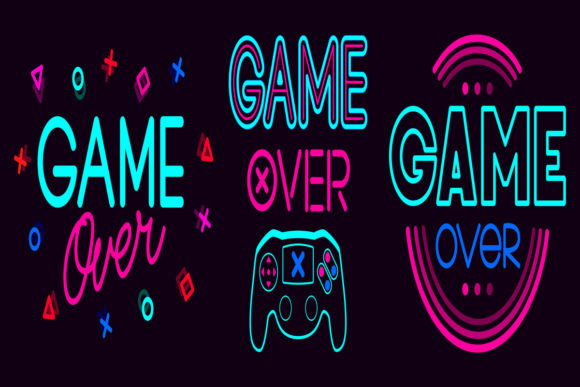
One of the most popular and effective styles for these graphics is the arcade neon design. This style directly taps into a rich vein of gaming nostalgia and visual appeal. The glowing, vibrant colors, the simulated light bleed, and the classic typography associated with neon signs evoke the feeling of 80s and 90s arcades, a golden era for many gamers.
When you incorporate Game Over Signs with an arcade neon design into your project, you're borrowing that immediate cultural recognition. The style is bold and eye-catching, ensuring the message is never missed. It works perfectly for retro-style games, arcade simulators, and even modern projects that want a punchy, energetic visual cue. The neon aesthetic isn't just about looking old; it's about leveraging a design language that is inherently exciting and attention-grabbing.
What You Get in a Professional Asset Pack
When you purchase or download a set of Game Over Signs, like the one described, understanding the file types is crucial for practical use. This particular product contains two key files, each serving a distinct purpose in your workflow.
The first and most important is the EPS10 file. EPS (Encapsulated PostScript) is a vector file format. This means the graphic is made up of mathematical paths and points, not pixels. The "10" indicates the version of the PostScript language. The benefits of a vector file are enormous for creators.
- Infinite Scalability: You can resize the Game Over sign to any dimension—from a tiny UI element to a full-screen backdrop—without any loss of quality or pixelation.
- Easy Editing: In software like Adobe Illustrator, Affinity Designer, or CorelDRAW, you can easily change colors, modify glow effects, adjust shapes, or separate elements. The vector format gives you complete creative control.
- Professional Output: Whether you're printing promotional materials, outputting to high-resolution screens, or embedding it in a game engine, vector files provide the cleanest, sharpest result.
The second file is a 72ppi Resolution JPEG as a preview. This is a raster image (made of pixels) at a standard web resolution. Its purpose is purely for quick viewing and evaluation. You can open it instantly in any image viewer, use it for early mock-ups, or share it in pitch decks without needing specialized software. It's a convenient reference, but for actual implementation in your final project, you will always use the EPS vector file.
Integrating Game Over Signs into Your Workflow
How do you actually use these assets? The process is straightforward but depends on your final medium.
For video game development, you'll import the EPS file into your preferred graphic software, make any necessary adjustments (like tweaking the neon colors to match your game's palette), and then export it as a PNG or another format your game engine accepts (Unity, Unreal, Godot, etc.). You then implement it as a UI sprite or overlay that triggers when the game-over condition is met.
For video content and streaming, such as YouTube gaming reviews, montages, or esports broadcasts, these Game Over Signs are perfect for editing. You can animate them, use them as transition elements, or overlay them on footage to highlight a failed attempt. The neon design particularly stands out well against fast-moving video.
For graphic design and marketing, the signs can be used in promotional materials, website banners, or social media posts announcing a game's launch or an event. The iconic nature of the graphic makes it immediately understandable.
Key Considerations Before Choosing Your Assets
Not all graphic packs are equal. When looking for Game Over Signs or similar UI assets, keep a few practical factors in mind.
File Format Flexibility: Always check if a vector format like EPS, SVG, or AI is included. This is non-negotiable for professional use. Raster-only packs (just PNG or JPG) severely limit your ability to scale and edit.
Style Compatibility: Does the arcade neon design fit your project's overall visual theme? If your game is minimalist or has a rustic art style, a glowing neon sign might clash. Be sure the aesthetic aligns.
Licensing and Usage Rights: Most asset packs are for personal and commercial use, but always verify. You need to know you can use these Game Over Signs in a game you sell or a video you monetize without legal issues.
Editability: Can you easily change it? The best assets are provided in layered vector formats, allowing you to turn off the glow, change "Game Over" to "Level Failed," or recolor elements without starting from scratch.
A Versatile Tool for Modern Creators
The role of a Game Over sign has expanded beyond just video games. In today's digital culture, the phrase and its visual representation are part of a wider lexicon. They are used metaphorically in presentations, humorously in memes, and literally in all forms of interactive media.
For a game developer, it's a core UI component. For a video editor, it's a dynamic visual effect. For a graphic designer, it's a recognizable icon. Having a high-quality, editable set of Game Over Signs in your asset library means you have a ready-made solution for any project that needs to communicate an end, a failure, or a decisive conclusion in a visually striking way.
Ultimately, these small details—the polish on your menus, the design of your buttons, the artistry of your Game Over screen—cumulatively define the quality of your project. They show an attention to detail that players and viewers appreciate. A stylish, well-implemented Game Over sign doesn't just tell someone they've lost; it tells them they've been playing something crafted with care.