YouTube Thumbnails Pack V2: A Tool for Creators Seeking Visual Impact
You’ve finalized your video, the audio is crisp, and the content is solid. Now, you face the final hurdle: convincing someone to click on it. That battle is won or lost in the thumbnail. For many creators, designing that perfect, click-worthy image is a recurring challenge, consuming time and creative energy week after week. This is where a resource like YouTube Thumbnails Pack V2 shifts from being a simple collection of graphics to becoming a practical workflow solution. It’s not just about having templates; it’s about having a structured, editable starting point that fits multiple niches, allowing you to focus your effort on customization rather than creation from a blank slate.
Beyond Generic Templates: Packaged Themes for Real Channels
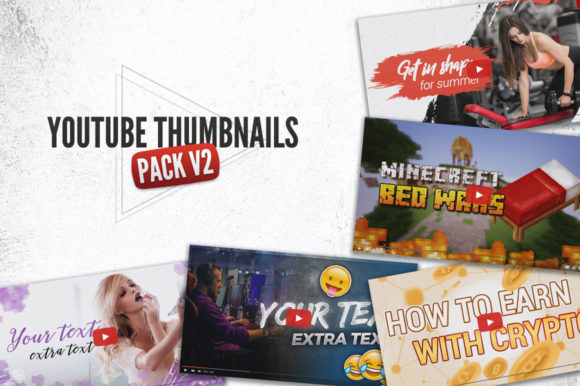
The standout feature of YouTube Thumbnails Pack V2 is its organization around five distinct thematic packs. This isn’t a random assortment of arrows and explosion graphics. It’s curated for actual content categories, recognizing that a fitness channel’s visual language differs fundamentally from a crypto analysis channel. This thematic approach means you’re not starting with a generic template that you must heavily twist to fit your topic. You’re starting with a foundation that already speaks to your audience’s expectations.
Where These Themes Fit Into the Real World
Consider the Minecraft pack with its three styles. A gameplay channel might use a bold, action-oriented style for an epic build video, while a tutorial channel might lean on a cleaner, instructional-style template from the same pack for a “how-to” video. The pack understands the game’s visual ecosystem.
The crypto theme pack addresses a niche that demands a mix of data seriousness and market excitement. A template with charts and bold percentages instantly signals an analysis video, while another with a more dramatic, headline-style layout could work for a market news update. It provides the visual shorthand that a specific, knowledgeable audience recognizes.
The makeup guru pack, with five color variations, tackles a highly visual and style-conscious niche. A beauty creator can match the thumbnail’s dominant color to the video’s theme—a pink palette for a soft glam look, a dark burgundy for a dramatic evening makeup tutorial. This allows for brand consistency and immediate thematic signaling.
Similarly, the broad gaming pack and fitness theme pack cater to massive verticals. A fitness coach could use different color-coded templates for different series: blue for weightlifting fundamentals, green for nutrition tips, red for high-intensity workout challenges. This creates a visual library for the channel itself, making content organization clear to subscribers.
The Practical Advantage: Editable .PSD Files and Organized Assets
Many template packs offer final images or cumbersome files. The practical value here lies in the easy editable .PSD files. For anyone with access to Photoshop (or similar software that handles PSDs), this is the key. Each element—text layers, background layers, graphic accents—is typically separated. You aren’t fighting with a flattened image. You can change the text, reposition the slogan, swap out a color overlay, or remove an element that doesn’t suit your specific video with a few clicks.
The inclusion of free fonts links is another thoughtful touch. It ensures you can easily obtain and use the exact fonts the designer intended, maintaining the professional cohesion of the template without font licensing issues or mismatched styles. The Full HD resolution 1920×1080 guarantees your thumbnail meets the platform’s technical quality standards, looking sharp on any device.
A crucial note: the images are not included in the download files. This means the templates provide the framework—the text layouts, borders, badges, and compositional elements—but you populate them with your own video-specific screenshots, photos, or branded imagery. This prevents your thumbnails from looking like anyone else’s using the same pack and ensures your unique content is the star.
Common Considerations Before Using a Template Pack
While a pack like this accelerates production, a few considerations are vital for effective use. First, brand alignment: Do the styles, even within your niche’s theme, complement your channel’s existing color scheme and tone? You may customize them, but the starting point should feel adjacent to your brand.
Second, avoiding homogeneity: If you use the same base template for every video, your channel page might look monotonous. The value of having multiple styles and colors within a pack is to create variation. Rotate between styles for different video series or topics to maintain visual interest across your channel grid.
Third, skill requirement: While the files are editable, you need basic competency with image editing software to manipulate the PSDs effectively. If you’re entirely new to such tools, there will be a learning curve to understand layers and basic editing functions.
How Different Creators Benefit in Different Ways
The utility of YouTube Thumbnails Pack V2 changes depending on the creator’s situation.
For the solo creator or busy entrepreneur running a channel alongside other work, it’s a time-saver. It removes the hours spent sketching layouts or learning design principles. They can select a template, insert their custom image and text, and produce a professional-looking thumbnail in minutes, consistently.
For the small team or agency managing multiple channels, it’s a standardization tool. They can adopt a specific theme pack for a client’s channel, ensuring all thumbnails maintain a cohesive professional style, speeding up the approval process and maintaining visual quality across different editors or designers.
For the experienced creator looking to refresh their channel’s look, it’s an inspiration and renovation resource. They might not use the templates directly but can dissect the PSDs to understand new layout trends, color combinations, and compositional ideas in their niche, applying those insights to their own custom designs.
For the new creator just starting out, it’s a confidence booster and quality floor-raiser. It ensures their first thumbnails don’t look amateurish, helping them compete visually from day one while they learn the intricacies of content creation. It allows them to focus on making great videos, not on struggling with design.
Recognizing the Limitations to Maximize the Value
A template pack is a powerful tool, not a magic wand. Its primary limitation is that it provides structure, not uniqueness. The final thumbnail’s success still hinges on your choice of the custom image you place within it. You must select a compelling screenshot or photo that tells a story. The template frames it, but the image must sell it.
Additionally, while the five themes cover popular niches, they may not fit hyper-specialized content areas. A creator in a very unique field might find the need to adapt the templates more extensively. However, the organized PSD files still offer a far better starting point than a blank canvas.
Ultimately, YouTube Thumbnails Pack V2 addresses a specific, repeated pain point in the content creation cycle. It turns thumbnail design from a creative roadblock into an efficient, organized step. By providing well-made, niche-specific foundations that you can arrange and edit to your liking, it empowers you to maintain visual quality and consistency, freeing up mental space and time for what matters most: creating the video itself.