Visualizing Your Nintendo Switch Game with a Professional Mockup
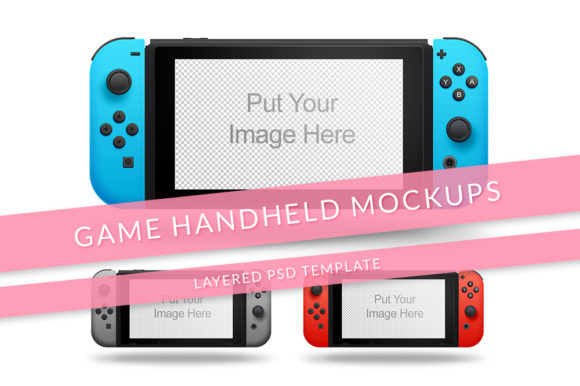
If you're developing a game for the Nintendo Switch, a crucial step in presenting your work is creating visuals that feel authentic and exciting. A Game Console Nintendo Switch Mockup provides the perfect canvas for this. It's more than just a picture; it's a layered digital file designed to showcase your game's logo, title art, or interface on the console's screen and body in a realistic setting.
What Exactly Is a Nintendo Switch Mockup?
Think of it as a digital template. Typically a layered PSD file, a Game Console Nintendo Switch Mockup features a high-quality image of the console itself. The key components, like the screen or the front panel, are separated into individual "smart objects" or layers. This structure allows you to easily replace the placeholder image with your own game artwork simply by double-clicking. The mockup specifications—often 72 dpi, RGB color mode, with a minimum resolution of 2200px—ensure the final composite image is sharp and suitable for web use, marketing materials, or pitch documents.
The Simple Power of Smart Objects and Layers
The process is intentionally straightforward to be easy to use. You open the file in an image editor like Photoshop. To insert your game's visual, you locate the smart object layer for the screen, double-click it, paste in your artwork, and save. The main mockup updates instantly, showing your design perfectly fitted onto the console's display, complete with realistic shadows, lighting, and reflections. Furthermore, many mockups include hidden layers that allow you to change color options and style. You might be able to toggle between a standard Neon Red/Blue Switch and a sleek all-black model, or show the console with joy-con attached versus detached, simply by hiding or showing specific layers in the file.
Who Benefits from Using This Tool?
The application of a Popular game Console Mock-Up extends far beyond just game developers.
- Independent Game Developers & Studios: Creating compelling store page images, social media announcements, and crowdfunding campaign visuals.
- Marketing Professionals & Agencies: Producing authentic advertising materials for clients without needing expensive physical photography.
- Content Creators & Streamers: Designing eye-catching channel art, video thumbnails, and website graphics that feature the games they play.
- Business Owners in Gaming Accessories: Showing their products, like cases or skins, mounted on a realistic Switch in online stores.
- UI/UX Designers & Concept Artists: Presenting their interface or artistic concepts in a real-world context for portfolio presentations.
Real-World Scenarios and Practical Applications
Imagine you’re preparing to launch your indie game on the Nintendo eShop. You need a banner that captures attention. Using a Game Console Nintendo Switch Mockup, you can generate a professional-looking image of your game running on the Switch in a cozy living room setup. This instantly communicates platform and context to potential buyers.
Or consider a blogger writing a review. Instead of describing a game's menu, they can use a mockup to create an image showing the exact menu on the Switch screen, making the article more informative and visually engaging. For a hardware company selling decorative skins, mockups allow them to showcase every color variant on the console without photographing dozens of physical units.
Strengths and Considerations for Your Project
The primary strength of these mockups is their ability to generate high-quality, context-rich visuals quickly and at a low cost. They democratize professional presentation. However, there are practical expectations to keep in mind. The output quality depends on the resolution of your source artwork and the mockup file itself. A minimum 2200px resolution is recommended for crisp results. Also, while they are incredibly versatile, they are static images. For animations or interactive presentations, additional tools are needed. Always ensure the mockup you choose matches the tone of your project—a studio-quality render for a formal pitch, a playful, angled shot for a lively social media post.
Evaluating if a Nintendo Switch Mockup is Right for You
To decide if a Game Console Nintendo Switch Mockup suits your needs, ask a few guiding questions.
- What is my end goal? Is it for a static image (website, print flyer) or something more dynamic?
- Do I need to show specific details? Does the mockup offer the right angle (front, top, handheld mode) to highlight what's important?
- How much customization do I require? Check if the mockup includes the layer options to change color option and style you need.
- What is my technical comfort level? Basic Photoshop skills are usually sufficient, but confirm you can work with PSD layered files.
If your answers lean towards needing fast, realistic, and customizable still images for communication or marketing, a mockup is likely an excellent fit.
The Value Beyond a Single Image
Ultimately, investing in a good Popular game Console Mock-Up is about investing in clear communication. It helps bridge the gap between your idea and your audience's understanding. By placing your game directly into the familiar environment of a Nintendo Switch, you make it tangible. This visual shorthand tells a story: "This product exists for this platform and is ready for you to play." Whether you're a creator sharing your passion, a professional building a brand, or a business owner showcasing a product, a well-used mockup adds a layer of credibility and appeal that text alone cannot achieve. It turns a concept into a convincing visual experience, and in today's digital world, that experience is often the first, and most important, connection you make.